

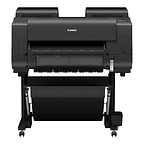
imagePROGRAF PRO-2600
Best for: Photographers, fine-art printers, and design studios producing exhibition-quality prints up to 24 inches wide
- Output: Wide format
- Max size: 24 in wide
Nashville · Since 1982Family-owned in Nashville, TN · Since 1982Family-owned in Nashville, TN · Serving the Southeast since 1982
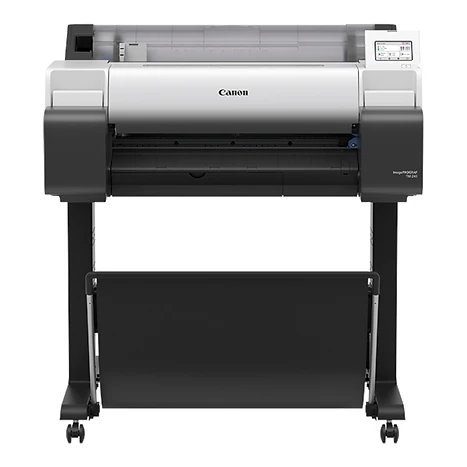
 imagePROGRAF TM-240
A compact 24-inch entry printer for CAD drawings, posters, and signage.
Best for: Small offices, schools, and retail locations that need occasional D-size drawings and in-house posters
Overview
The imagePROGRAF TM-240 is the 24-inch entry point to Canon's TM Series: a compact, flat-top large-format printer that prints an Arch D CAD drawing in about 23 seconds — roughly 2.4 D-size pages a minute — with 55 ml ink tanks and an optional basket. It suits offices that need a dependable plotter for drawings and the occasional poster without a dedicated print room, and it can be paired with the Lm24 scanner as the TM-240 MFP Lm24 for simple, PC-free scan-to-copy.
Every TM model uses the same LUCIA TD 5-color pigment ink set with a newly formulated magenta for strong reds on posters and retail displays. Pigment inks resist fading for long-term display and give water resistance outdoors. Built-in color calibration keeps output consistent over time and across multiple TM Series printers, and automatic paper detection reads media type, length, and width and shows them on the home screen.
The L-COA PRO II processor makes the series about 30 percent faster than the previous generation. The flat-body design allows full front operation, the 4.3-inch user interface tilts up, ink tanks hot-swap, and noise has been reduced. PosterArtist, Free Layout Plus, Direct Print Plus, and Accounting Manager are included, and the series is EPEAT Gold registered and ENERGY STAR certified.
Key features
Matte black, black, cyan, magenta, and yellow pigment inks. The reformulated magenta produces vivid reds for posters and point-of-purchase signs, and pigment ink resists fading and water.
The L-COA PRO II processor prints an Arch D portrait CAD drawing in about 23 seconds, roughly 2.4 D-size pages a minute.
Full front operation, a flat top you can use as a work surface, and a home screen that shows ink and sub-tank levels, media levels, and setting prompts.
Load a roll and the printer detects media type, length, and width and displays them on the home screen.
The TM-240 MFP Lm24 adds a 24-inch scanner with a green-button scan-to-copy workflow that needs no PC: up to 4.5 inches per second monochrome, 600 dpi, and a 3.5-inch LCD touchscreen.
PosterArtist builds posters, banners, and flyers from templates in four steps. Free Layout Plus nests and tiles files, Direct Print Plus batch prints, and Accounting Manager tracks ink and media costs.
Registered EPEAT Gold and ENERGY STAR certified, with cardboard packaging in place of EPS foam.
Included with every system
The imagePROGRAF TM-240 is the same everywhere. What's different is the 44 years of local service behind it.
We deliver, unbox, place, and connect the device to your network and every workstation that needs it. You print the first page before we leave.
A Canon-certified technician walks your staff through the panel, scanning workflows, and the everyday things that generate service calls when nobody explains them.
Supplies ship before you run out, based on your device's own meter readings. Genuine Canon consumables only, so your warranty and image quality stay intact.
Local technicians dispatched from our office in Old Hickory, not a national ticket queue. Average response is under four hours.
Lease, rent, or buy. Separate color and mono cost-per-page, no hidden escalators, and a person who answers questions about the contract by name.
The same person from proposal through the life of the system. They know your account, your volumes, and when it's time to talk about what's next.
Related models
Other imagePROGRAF models and nearby large format options.
Best for: Photographers, fine-art printers, and design studios producing exhibition-quality prints up to 24 inches wide
Best for: Photographers, galleries, and fine-art labs producing exhibition-quality prints up to 44 inches wide
Best for: Fine-art labs, museums, and photographic printers producing exhibition-scale prints up to 60 inches wide
Call, email, or send a message — whichever is easiest for you. We'll take it from there.
Specifications
Specifications are summarized from Canon's published materials and can change; confirm details on the Canon spec sheet or with our team before ordering.

