


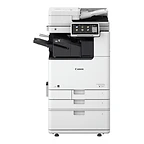
imageRUNNER ADVANCE DX 4945i
Best for: Mid-volume departments that need ledger-size black-and-white with fast duplex scanning
- Speed: 45 ppm
- Output: Mono
- Max size: Ledger
Nashville · Since 1982Family-owned in Nashville, TN · Since 1982Family-owned in Nashville, TN · Serving the Southeast since 1982
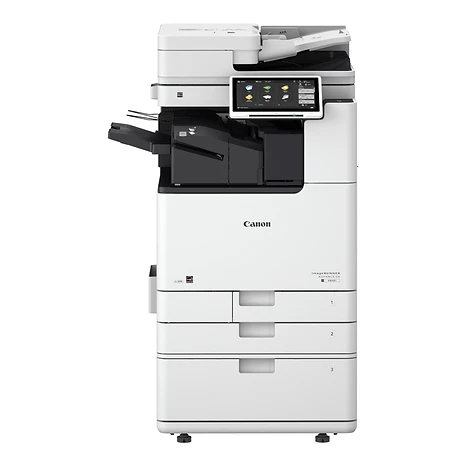
 imageRUNNER ADVANCE DX 4935i
35 ppm black-and-white A3 for workgroups with steady ledger-size volume.
Best for: Workgroups and departments with moderate black-and-white volume that need 11 × 17
Overview
The imageRUNNER ADVANCE DX 4935i is the 35-page-per-minute model in Canon's 4900 series — a black-and-white A3 multifunction system for workgroups and departments with steady volume that need ledger-size output. It prints 35 ppm on letter, 23 ppm on letter-rotated, and 17 ppm on legal and 11 × 17, and produces a first copy in as little as 5.5 seconds. A document feeder is chosen at configuration: the 200-sheet Single Pass DADF-C1 for 270 ipm duplex scanning, or the 100-sheet DADF-BA1 for lighter scan loads.
The 4900 series prints at 1200 × 1200 dpi with Canon's V² imaging profile for consistent, striking output. Scans go to email, folders, USB, or the cloud as searchable PDF, PDF/A, or editable Word and PowerPoint files. Print from Windows, Mac, iOS, Android, and Chrome OS devices with AirPrint, Mopria, Universal Print, or Canon PRINT Business. Paper capacity starts at 1,200 sheets and grows to 3,650 with the high-capacity cassette; the lower cassette and multipurpose tray handle stock up to 12 × 18, and optional inner, staple, and booklet finishers add stapling and saddle-stitching.
The 10.1-inch touchscreen with My ADVANCE personalization matches the rest of the imageRUNNER ADVANCE DX line, and Canon's Unified Firmware Platform keeps the device gaining features through regular updates. Print, copy, scan, send, and store are standard; fax (up to four lines) is optional.
Key features
Canon's V² imaging profile and toner deliver consistently striking output, with a first copy in as little as 5.5 seconds.
The 200-sheet Single Pass DADF-C1 captures both sides at up to 270 ipm in full color; the 100-sheet DADF-BA1 suits lighter scanning. Either sends searchable PDF, PDF/A, or editable Word and PowerPoint.
AirPrint, Mopria, Universal Print, Canon PRINT Business, and the optional Cloud Connector and uniFLOW Online. PCL 6, PostScript 3, and UFR II are standard.
Verify System at Startup with automatic recovery, Trellix™ Embedded Control whitelisting, FIPS 140-3 SSD encryption on a TPM platform, Recommended Security Settings by environment, and SIEM integration.
Stock to 12 × 18 and 140 lb index; optional Inner Finisher-L1 staples inside the footprint, and Staple or Booklet Finisher-AE1 add 3,250-sheet output, hole punching, and saddle-stitched booklets.
A 10.1-inch touchscreen with smartphone-like usability and My ADVANCE personalization — the same on every imageRUNNER ADVANCE DX model.
Lower-melting-point toner and efficient fusing keep energy use down. ENERGY STAR® certified and rated EPEAT Gold and EPEAT Climate+, with cardboard packaging and regrind-plastic drum covers.
Included with every system
The imageRUNNER ADVANCE DX 4935i is the same everywhere. What's different is the 44 years of local service behind it.
We deliver, unbox, place, and connect the device to your network and every workstation that needs it. You print the first page before we leave.
A Canon-certified technician walks your staff through the panel, scanning workflows, and the everyday things that generate service calls when nobody explains them.
Supplies ship before you run out, based on your device's own meter readings. Genuine Canon consumables only, so your warranty and image quality stay intact.
Local technicians dispatched from our office in Old Hickory, not a national ticket queue. Average response is under four hours.
Lease, rent, or buy. Separate color and mono cost-per-page, no hidden escalators, and a person who answers questions about the contract by name.
The same person from proposal through the life of the system. They know your account, your volumes, and when it's time to talk about what's next.
Related models
Other imageRUNNER ADVANCE DX models and nearby monochrome options.
Best for: Mid-volume departments that need ledger-size black-and-white with fast duplex scanning
Best for: Smaller offices with light black-and-white volume that need 11 × 17 and finishing options
Best for: Small and home offices that need a complete black-and-white MFP that fits on a desk
Call, email, or send a message — whichever is easiest for you. We'll take it from there.
Specifications
Specifications are summarized from Canon's published materials and can change; confirm details on the Canon spec sheet or with our team before ordering.

