

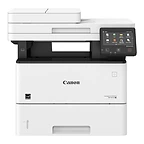
imageCLASS X MF1643i II
Best for: Small and mid-size workgroups that need a black-and-white MFP with expandable paper capacity and no fax line
- Speed: 45 ppm
- Output: Mono
- Max size: Legal
Nashville · Since 1982Family-owned in Nashville, TN · Since 1982Family-owned in Nashville, TN · Serving the Southeast since 1982
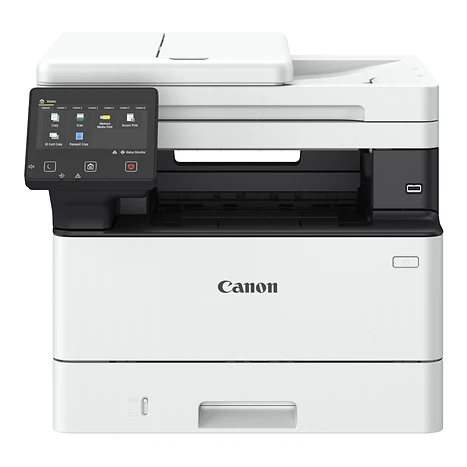
 imageCLASS X MF1440
42 ppm black-and-white print, copy, scan, and fax with single-pass duplex scanning on a desk.
Best for: Small and home offices that need a complete black-and-white MFP that fits on a desk
Overview
The imageCLASS X MF1440 is a 42-page-per-minute black-and-white desktop multifunction printer for small workgroups within an office or home environment that is part of an organization's wider print fleet. It adds copy, scan, send, and fax to the engine of the LBP1440, with a single-pass duplex document feeder that scans both sides of a page at up to 100 images per minute. First print is about 4.9 seconds, first copy about 6 seconds, and it wakes from sleep in 4 seconds.
The 1440 series prints at 600 × 600 dpi with UFR II, PCL 6, PCL 5, and Adobe PostScript 3 standard, two-sided printing out of the box, and direct print from USB memory. Scans go to email, network folders, or USB as searchable or compact PDF, TIFF, or JPEG. Print from Windows, Mac, iOS, and Android devices with AirPrint, Mopria, Universal Print, or the Canon PRINT Business app; Wi-Fi, Wi-Fi Direct, and Gigabit Ethernet are all standard. Paper capacity starts at 250 sheets and grows to 900 with the optional 550-sheet Cassette-AH1, and the T13 toner is rated for up to 10,600 pages.
The 5-inch touchscreen mirrors the imageRUNNER ADVANCE DX interface, so users who move between machines see the same layout, and Application Library lets an administrator build one-touch buttons for ID card copy, scan-to-preset, and more. Documents are held in short-term memory only, Verify System at Startup checks firmware at boot and recovers automatically, a Send-to-Myself-Only restriction limits distribution, and imageWARE Enterprise Management Console pushes security settings to every device on the network.
Key features
A first page in about 4.9 seconds, a first copy in about 6, and 42 pages a minute on Letter; it wakes from sleep in 4 seconds.
Both sides of a page in one pass at up to 100 ipm black-and-white or 80 ipm color from the 50-sheet feeder, to PC, USB, email, or the network as searchable PDF. Super G3 fax is built in.
Smartphone-like navigation with drag-and-drop icons, consistent with the imageRUNNER ADVANCE DX series. Application Library adds one-touch buttons for ID card copy, passport copy, scan-to-preset, and more.
AirPrint, Mopria, Canon PRINT Business, Universal Print, and optional uniFLOW Online. Wi-Fi, Wi-Fi Direct, and Gigabit Ethernet are all standard.
Documents are held in short-term memory only. Verify System at Startup checks firmware at boot and recovers automatically, and a Send-to-Myself-Only restriction limits where scans can go.
A 10,600-page T13 toner, standard two-sided and N-up printing, low-melting-point toner, ENERGY STAR® certification, and an EPEAT Silver rating.
Included with every system
The imageCLASS X MF1440 is the same everywhere. What's different is the 44 years of local service behind it.
We deliver, unbox, place, and connect the device to your network and every workstation that needs it. You print the first page before we leave.
A Canon-certified technician walks your staff through the panel, scanning workflows, and the everyday things that generate service calls when nobody explains them.
Supplies ship before you run out, based on your device's own meter readings. Genuine Canon consumables only, so your warranty and image quality stay intact.
Local technicians dispatched from our office in Old Hickory, not a national ticket queue. Average response is under four hours.
Lease, rent, or buy. Separate color and mono cost-per-page, no hidden escalators, and a person who answers questions about the contract by name.
The same person from proposal through the life of the system. They know your account, your volumes, and when it's time to talk about what's next.
Related models
Other imageCLASS models and nearby monochrome options.
Best for: Small and mid-size workgroups that need a black-and-white MFP with expandable paper capacity and no fax line
Best for: Small and mid-size workgroups that need a complete black-and-white MFP with fax and expandable paper capacity
Best for: Small and home offices that need a complete black-and-white MFP on a desk
Call, email, or send a message — whichever is easiest for you. We'll take it from there.
Specifications
Specifications are summarized from Canon's published materials and can change; confirm details on the Canon spec sheet or with our team before ordering.

